A prospective client calls your firm after closing. The office is dark, the staff are gone, and the caller is trying to remember whether the crash happened early or later in the month. They also know treatment began afterward, but they’re unsure when. The phone system answers. What happens next depends on what kind of system is answering.
“Automated answering service” can mean a mailbox that saves a message, a menu that routes a caller, or a configured conversational system that asks questions. Those are different tools, not interchangeable labels. Answering a call doesn’t mean giving legal advice, deciding whether a matter qualifies, accepting a case, or guaranteeing a live transfer.
For solo attorneys, small firms, intake managers, and plaintiff practices, the practical question is simple: what can the caller do, and what will the firm be able to review afterward?
Start With the After Hours Call
Fictional example: After the office closes, a prospective personal-injury client calls about a collision. The caller remembers that it happened sometime in March and says treatment began about a week later, but can’t confidently name either date. A voicemail can preserve that uncertainty. A fixed menu can offer choices. A conversational intake workflow, if configured and tested for it, may ask follow-up questions and confirm what the caller remembers.

The useful question isn’t whether a vendor calls its product an answering automated service, virtual receptionist, or AI intake tool. Ask what happens when the caller gives an incomplete answer, asks to speak to a person, or reaches a transfer destination that doesn’t answer. A system’s name doesn’t establish that it can clarify facts, screen a personal-injury inquiry, or connect a caller live.
That distinction matters because the caller may share sensitive details before speaking with an attorney. The system’s job might be limited to recording a message, or it might collect information for staff to review. Even a conversational system should be understood as an intake aid, not as a lawyer or a decision-maker on case acceptance.
Firms comparing options can use a legal answering service overview from CasePulse as a starting point for thinking about coverage and call handling. Then test the specific service under realistic conditions. For a small practice, the right arrangement is the one that preserves access without obscuring how a caller reaches a person or how staff retain judgment.
Practical rule: Treat the advertised label as a starting point. Treat observed call behavior and the saved record as evidence of what the service actually does.
Understand Three Answering Models
Think of three familiar ways to handle a call: leaving a note, choosing from a directory, and speaking with a receptionist. The analogy helps separate what a system does from what its name might suggest.
A voicemail system stores a caller’s recorded message for someone to retrieve later. It’s like leaving a note on a desk. The message may include useful details, but voicemail doesn’t itself interview the caller or resolve uncertainty.
A keypad menu, often called interactive voice response or IVR, offers fixed choices. It’s like choosing a department from a phone directory: press a number, and the system routes the call according to that selection. The FCC distinguishes voicemail from IVR systems that provide callers with menus of choices in its guide to telecommunications access for people with disabilities.
Conversational AI intake is closer to speaking with a receptionist. It can interpret spoken answers and continue a multi-turn exchange, but only when the particular service is configured to do so. The label “AI” alone doesn’t prove that it can collect injury-law facts, clarify an answer, or transfer someone to staff.
| Answering model | What the caller can do | What it does not establish |
|---|---|---|
| Voicemail | Leave a recorded message for later review | An intake interview, clarification, screening, or transfer |
| Keypad menu | Choose from preset options and follow fixed routing | That the system can understand open-ended answers or resolve uncertainty |
| Conversational intake | Speak naturally and, if configured, answer follow-up questions | That the service qualifies every inquiry, reaches a person, or makes legal decisions |
These functions aren’t interchangeable. A caller who leaves a message may still need a callback; a caller who selects a menu option may still need to explain a complicated situation; and a conversational workflow may still be unable to handle a request outside its configuration.
For a firm, the question is not “Does it answer?” It’s “Can it perform the actions we need, and how does it behave when it can’t?”
Follow a Configured PI Intake Call
A configured personal-injury workflow begins when a call is routed to the service. The system follows the firm’s specified process, collects the intake facts selected by the firm, and attempts a transfer when the workflow calls for one. It can also be configured to respond to a request for human assistance, but that doesn’t make a live connection certain.
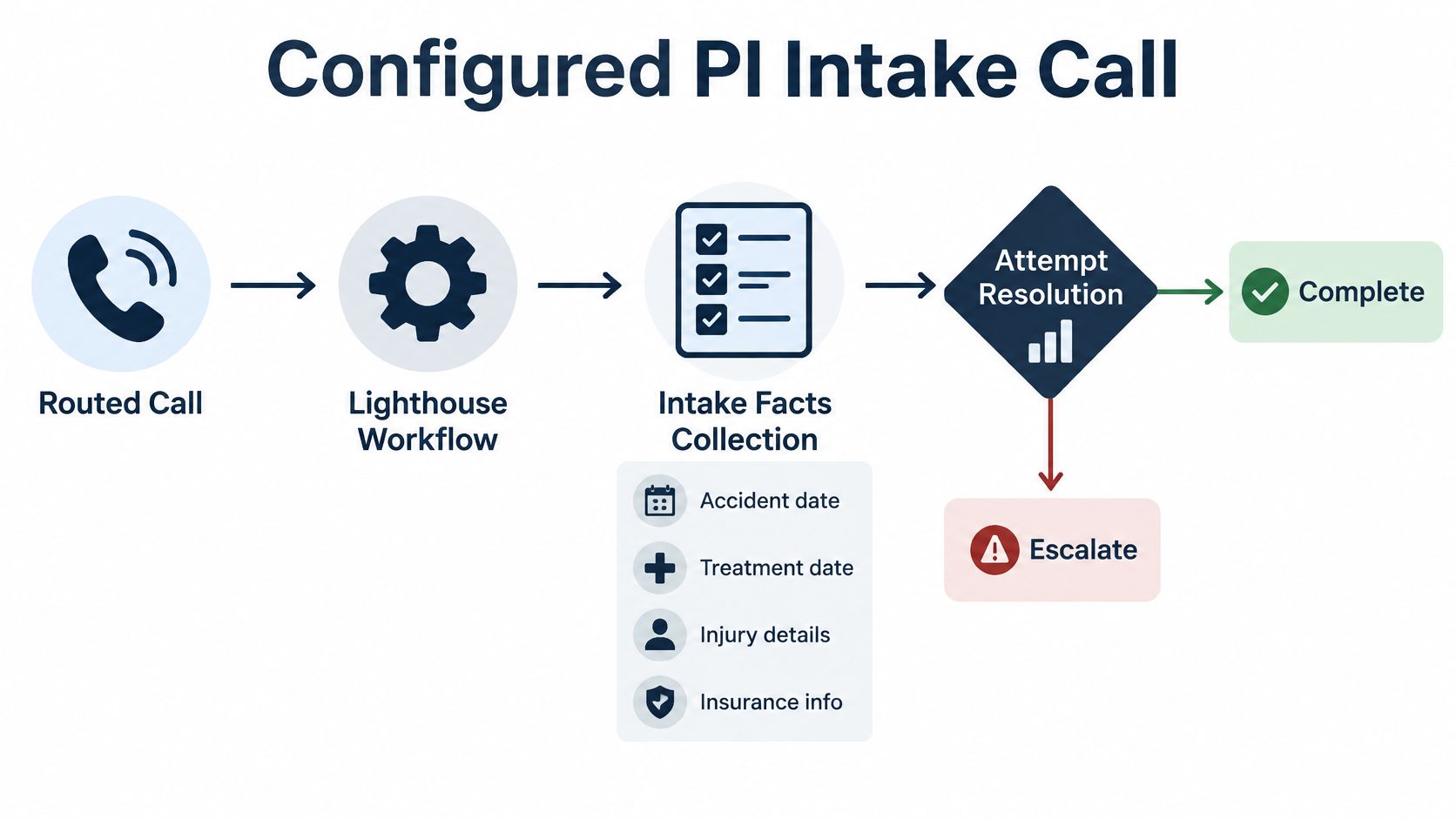
For Lighthouse Legal, the described operating model is narrow and practical: it answers routed calls, gathers the firm’s configured intake facts, and attempts transfers under the firm’s workflow. The firm reviews its screening and routing process before setup, then uses a new Lighthouse number or forwards an existing line. Its website states that deployment can occur within one business day. That is a stated deployment window for this service, not a general promise about every provider or every firm’s setup.
The firm defines what information matters and what should happen next. Depending on its workflow, that can include asking about the accident date, treatment date, injury details, or insurance information, then directing selected inquiries toward staff. The legal team still reviews the information and decides what action to take.
A comparison of AI intake specialists for injury cases can help firms frame evaluation questions, but a category comparison can’t replace a test of the specific call path being considered. A configured service can only follow the questions, rules, and routes that have been set up and checked.
The handoff is an attempt, not a guarantee. If the destination line doesn’t answer, the service should follow its configured fallback. Firms should verify what that fallback is rather than assume the caller will automatically reach a person or that every call ends with a complete intake.
Clarify the Facts That Matter
Fictional call excerpt
Caller: “The crash was sometime in March, and I started treatment maybe a week later.”
AI: “Do you mean March 3, March 13, or another date?”
Caller: “March 13.”
AI: “Was treatment on March 20, or do you remember only the month?”
Caller: “March 20.”
This example shows what a configured follow-up can accomplish. A system that accepts the first answer without checking may preserve an incomplete timeline. A workflow that asks for clarification can capture the caller’s answer more precisely, while still marking an unknown date as unknown if the caller can’t verify it.
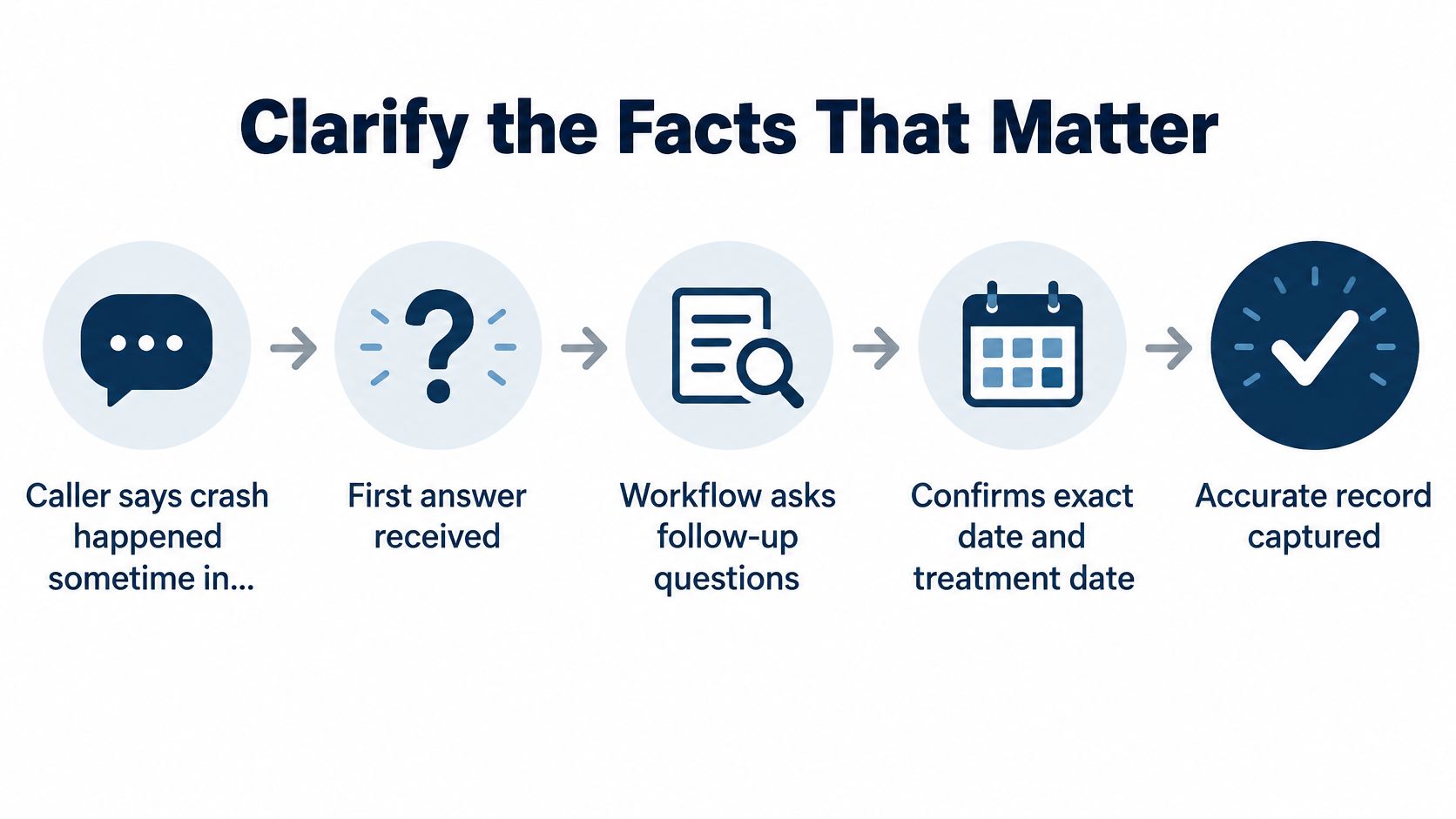
The chronology may help staff review the inquiry, understand what the caller recalls, and decide what follow-up questions to ask. It doesn’t tell the system whether the matter meets the firm’s legal criteria. A clarified record is still information for human review, not a legal conclusion.
After a test call like this, inspect the saved record. Check whether it shows the corrected crash date, the treatment date, any remaining uncertainty, and enough of the original explanation for staff to understand how the caller answered. If the system replaces an answer without preserving the correction history the firm needs, that may be a workflow problem worth resolving before launch.
For a practical question set to help shape intake, see personal-injury intake questions. The firm should decide which questions are appropriate for its own process and ensure that the workflow records missing or uncertain facts without filling them in by guesswork.
Evaluate Benefits and Boundaries
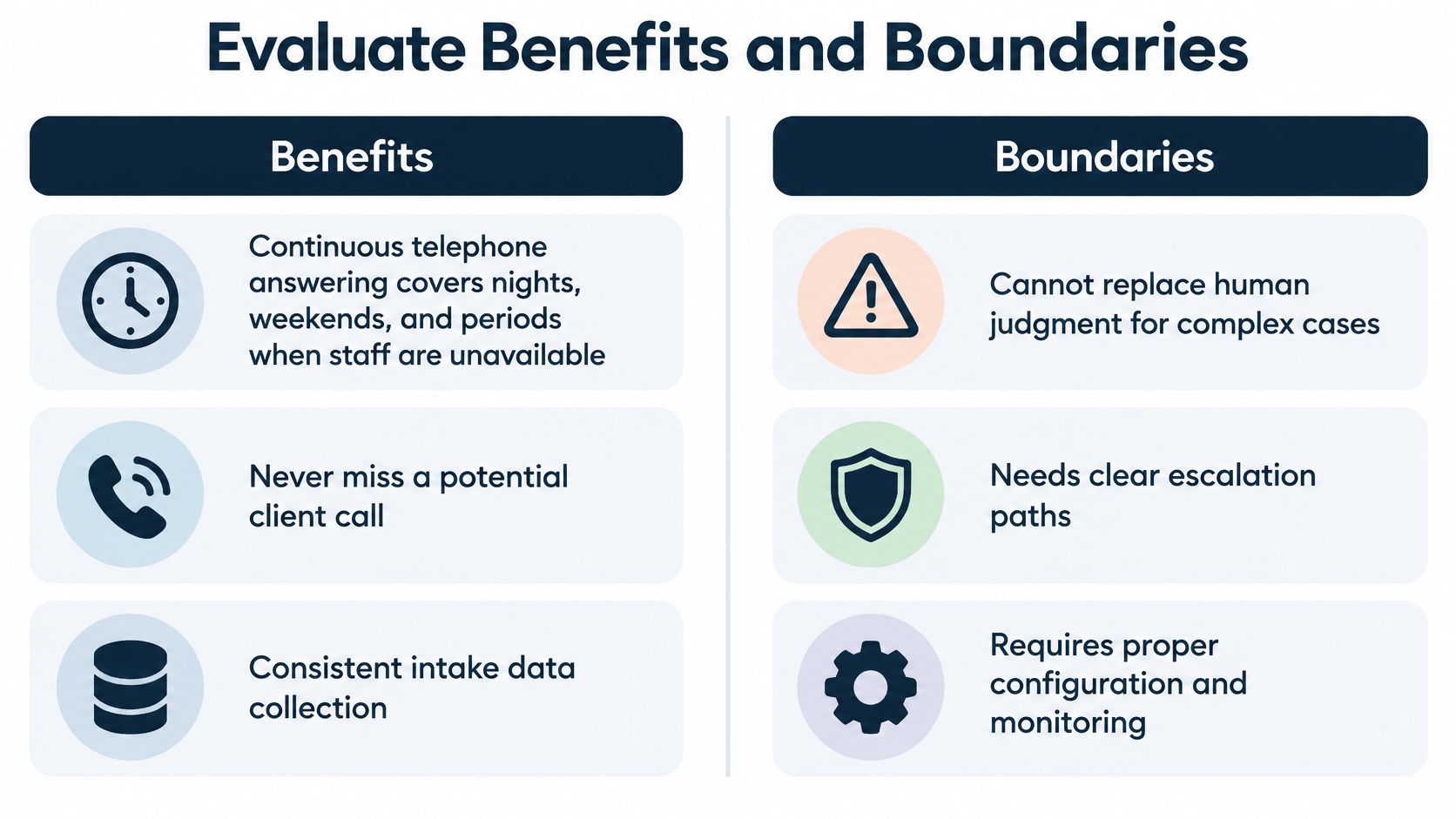
Continuous answering addresses one clear gap: calls can arrive at night, on weekends, or when staff are handling other work. Configurable screening addresses another: the firm can ask for facts that help its team review an inquiry. A transfer can attempt to connect a selected caller to staff rather than placing every call into a callback queue. Recordings, transcripts, and reports can give the team material for later review when those features are enabled and used in line with the firm’s process.
Published Lighthouse customer examples include 15 additional signed cases in three weeks and 47% filtering of irrelevant calls. These are customer-specific outcomes, not expected results for every firm or guarantees of future performance. The figures are described in industry material about personal-injury intake practices.
Match Functions to Gaps
A firm should connect each proposed function to a real operational need:
- Coverage: Calls can be answered when existing staff aren’t available.
- Screening: Questions can follow the firm’s chosen criteria, subject to the configuration.
- Routing: The system can attempt a handoff when the workflow calls for one.
- Review: Call records can help staff understand what was captured and what needs follow-up.
Each benefit has a boundary. A transfer attempt doesn’t guarantee a human connection. Screening doesn’t make the system the firm’s case-acceptance authority. A useful transcript doesn’t replace an attorney’s evaluation.
The service’s current approach generally absorbs temporary spikes in call volume. Substantial, sustained growth may be discussed at renewal, but firms shouldn’t assume usage is unlimited. Clarify the applicable contract terms and what happens if the firm’s pattern of use changes.
Automation is useful when it makes the next human decision better informed. It isn’t a substitute for that decision.
Test the Workflow Before Launch
Don’t rely on a product label or a polished demonstration. Run a short test that exposes whether the service can handle ordinary conversation, changes, and failed handoffs. A fixed keypad menu may not respond to spontaneous speech, while a configured conversational workflow may handle it. Only testing the actual service establishes which is true.
- Interrupt naturally. Speak while the system is talking and see whether it pauses, responds, or continues through the interruption. Note what a real caller would experience.
- Correct a fact. Give one date, then change it from March 3 to March 13. Check that the final saved information reflects the correction rather than the first answer.
- Ask for a person. Request a staff member or attorney and observe whether the configured workflow attempts a transfer. Don’t assume that every automated service supports this.
- Leave the transfer destination unanswered. Let the destination line ring without pickup. Record what the caller hears next, whether the system returns to the caller, and what fallback is used.
- Inspect the record. Review the captured answers, corrections, transfer outcome, and the status of any recording or transcript. Confirm that the saved details are clear enough for staff to act on.
Lighthouse’s guide to testing AI answering with Lighthouse provides a reference for a behavior-based test. The standard remains straightforward: verify what the configured workflow does, including what happens when it can’t complete the intended action.
Keep the service’s role precise. It can answer routed calls, collect the firm’s configured intake facts, and attempt transfers under that workflow. It doesn’t provide legal advice or guarantee case acceptance.
Choose an Answering Automated Service
Start with the job the firm needs done. If the need is to store after-hours messages, voicemail may be sufficient. If callers need to reach the right department through fixed choices, a keypad menu may fit. If the firm wants a spoken intake exchange, evaluate a conversational workflow and test its actual follow-up, correction, and escalation behavior.
Then define the information staff need to review. Decide which intake questions belong in the workflow, how the system should treat an answer the caller can’t verify, and what staff should see afterward. Ask to inspect a sample record created by a test call, including any correction and transfer result.
Review Consent and Access
Keep the AI introduction and recording notice distinct. Telling a caller that an AI is handling intake isn’t the same as telling the caller that the conversation is being recorded, and one shouldn’t be treated as a substitute for the other. Notice and consent obligations can vary with jurisdiction and circumstances, so review the planned wording and workflow with qualified counsel.
Lighthouse’s AI intake requires recording. Its recordings and transcripts apply to the intake call, not the private caller-attorney conversation after handoff: Lighthouse does not record or transcribe that private conversation. Confirm who can access the saved intake material, how the firm’s retention and deletion practices work, and whether the workflow supports the firm’s consent process.
Also ask how callers can reach a person, what happens if they decline automation, and what alternatives are available to callers with hearing, speech, language, or other access needs. A clear human option and a fallback for callers who can’t comfortably use voice interaction are practical parts of the call design, not add-ons to consider after launch.
Finally, review the commercial terms. Ask how temporary call spikes are handled, how substantial sustained growth may be addressed at renewal, and what the monthly pricing structure covers. Lighthouse’s specific prices are private; firms can ask about flat monthly pricing and contract terms without assuming that any particular price or integration is available. For general budgeting questions, consult how answering-service costs are evaluated.
Keep Humans in Control
A useful answering automated service preserves access when the office is closed, gathers the facts the firm needs, and routes calls according to a known workflow. The firm keeps responsibility for reviewing those facts, deciding what follow-up is appropriate, and determining whether it will accept a matter.
Judge the system by documented behavior, not assumptions. A transfer can be attempted without being guaranteed. Recorded AI intake needs appropriate notice and handling. A transcript is an intake aid, not an attorney-client determination or a substitute for legal judgment.
Before expanding the service’s role, test it with real questions, interruptions, corrections, requests for a person, and an unanswered transfer. Firms planning a hybrid process can also review how an AI receptionist can keep human backup available.
For solo attorneys and intake managers, the standard is memorable: automation should make human intake more reliable, not make human control harder to find.
Lighthouse Legal offers customizable AI voice agents for personal-injury firms to answer incoming calls, collect configured intake information, and attempt transfers under the firm’s workflow. Visit Lighthouse Legal to explore whether that approach fits your intake process.