
Lighthouse is built for personal injury intake: your questions, your case criteria and direct transfers to your staff. Smith.ai offers AI answering with backup from its own live-agent team.
Both offer 24/7 coverage and custom intake. The main choice is how you want calls handled and what your team needs afterward.
Written by Lighthouse. Product pages reviewed October 22, 2026; no head-to-head audio test.
Compare at a glance
| Feature | Lighthouse | Smith.ai |
|---|---|---|
| 24/7 call answering | Yes | Yes |
| Your intake questions | Yes | Yes |
| Transfers to your staff | Yes | Yes |
| Summaries and full transcripts | Yes | Yes |
| English and Spanish calls | Yes | Yes |
| Clio integration | Yes | Yes |
| Hands-on setup | Yes | Pro onboarding support; Enterprise full-service setup and custom prompting. |
| Voice tailoring | Yes | Choice of 12+ curated voices. |
| Personal injury focus | Yes | AI answering for law firms and other businesses. |
Checks show documented features. Smith.ai descriptions summarize its offering; plan and setup requirements may apply.
Smith.ai sources: AI Receptionist, plans, call records and bilingual answering. The table covers AI answering. Smith.ai also sells hybrid and human-first plans; choose the service model before comparing quotes.
Why choose Lighthouse
Choose Lighthouse for personal injury intake configured with your team. We tailor the questions, case criteria and call routing to your process. Request a custom voice with pace and pronunciation tuning. Staff get the case details they need for callbacks, with urgent calls transferred directly to them.
Choose who answers next
Choose Lighthouse when you want PI intake set up with your team and transfers to your own staff. Your firm supplies the people who take those transfers, including after hours.
Consider Smith.ai when you want access to receptionists supplied by the service. Its AI-first service starts with AI and can bring in its live agents. Its hybrid offer lets you choose which call types go to people. A human-first plan is a separate choice.
An outside receptionist and your on-call attorney do different jobs. Ask who receives a caller asking for a lawyer at 9 p.m., what that person can do, and what happens if the attorney does not answer. Our human handoff guide follows that path.
Set your intake rules
Set supported intake fields to Required, Optional or Disabled, then choose daytime and after-hours contacts.
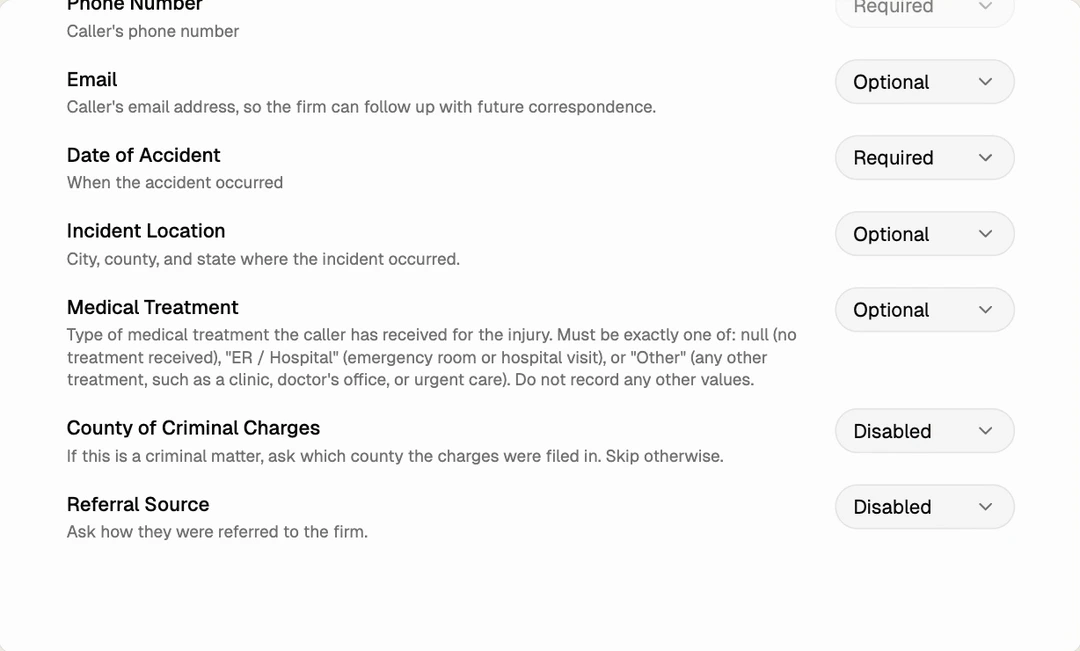
Smith.ai also supports custom call instructions and screening criteria. Its live-agent backup may suit firms that want outside human help. Lighthouse routes escalations directly to your own staff. See the full customization walkthrough.
Review at any depth
With Lighthouse, check the intake fields for your case criteria, skim a summary or read the full transcript. For Spanish calls, staff can read the English translation or the original Spanish.
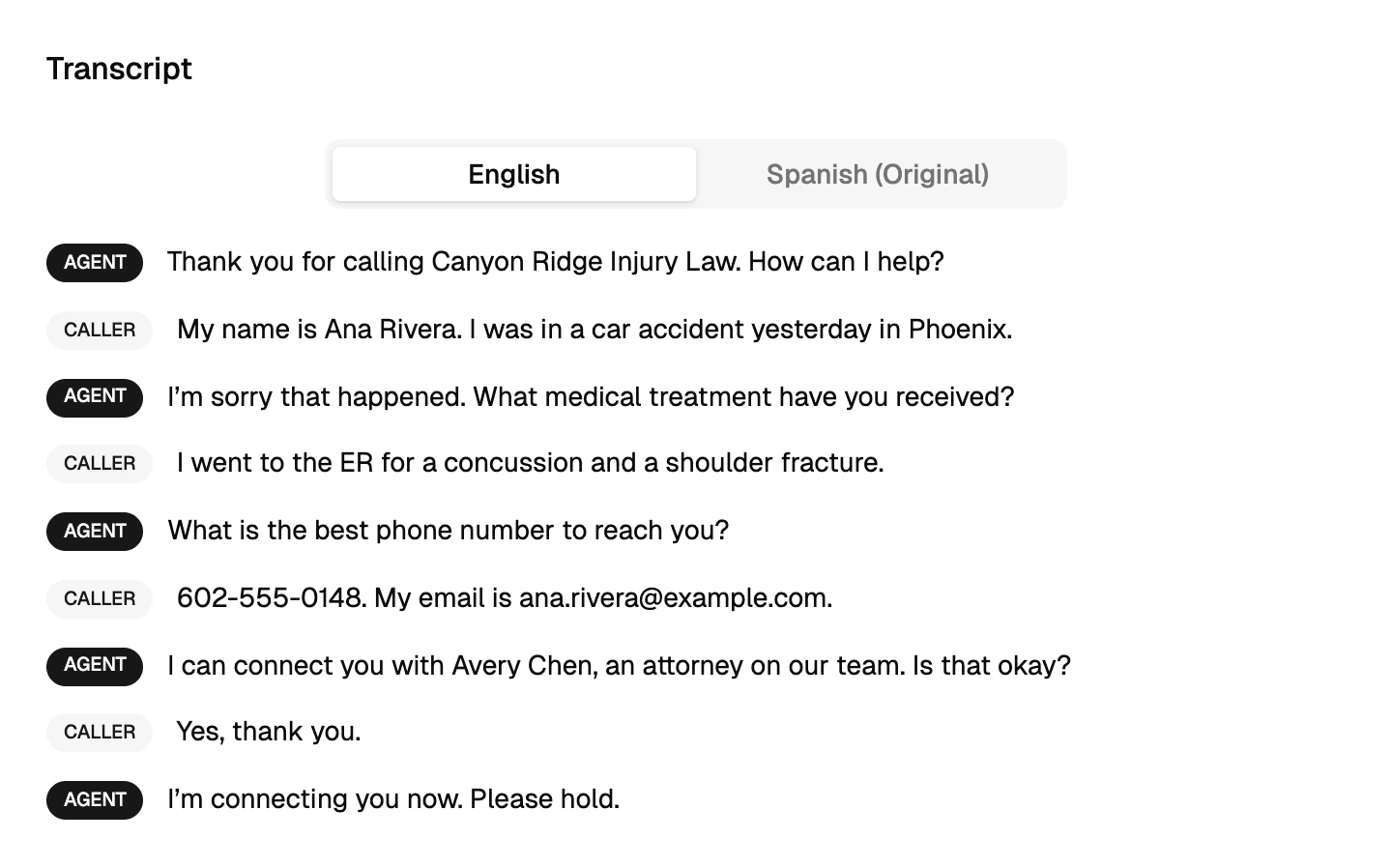
You can receive call-summary emails and connect Lighthouse to your firm’s case management system. Confirm which records your setup saves there. The full call record stays in Lighthouse. Our dashboard walkthrough shows the process.
Test the same call
Fictional example: a caller has a broken wrist after a crash. They received urgent care but do not have the bill yet. Your firm wants a callback for significant injuries; the bill is optional.
Use that same story with both services. Have the caller give (212) 555-0147, then correct it to (212) 555-0164. Give each service the same questions, optional-bill rule and transfer contact.
A useful review note would look like this:
Example · What staff need to find
- Injury and care
- Broken wrist after a crash; seen at urgent care
- Missing item
- Bill not yet available; optional under the firm’s instructions
- Callback number
- (212) 555-0164 · Use the corrected number for the callback
- Next step
- Staff review for a callback; check whether the attempted transfer connected
Then check four things:
- Conversation: Does it understand the caller without repeating questions?
- Record: Are the injury, care and corrected callback number easy to find? Does the missing bill stay marked as missing?
- Transfer: Does the right person get the call? Repeat without answering the staff phone and check the saved transfer result.
- Follow-up: Can staff see why the inquiry needs review? Name the person who will make the callback if the transfer fails.
Repeat in Spanish with a fluent reviewer if needed. Your team still decides whether to accept the case.
Compare the full cost
Lighthouse: a flat monthly fee based on call volume, without per-minute charges. Request a quote for your firm.
Smith.ai AI-first: its current plans list 25 free calls a month, Pro at $150/month for 75 calls, and Enterprise at $500/month for 300 calls. The 75-call Pro plan lists extra calls at $2.50 each. These are October 22, 2026 prices; a different plan changes the math.
Its live-agent billing guide adds $3 per call for selected human tasks, such as an enabled caller-requested handoff, human verification or certain scheduling tasks. It charges that add-on once per call. Internal AI escalations, outage fallback and transfers to your business do not incur that add-on.
Example bill: 100 billable calls on the 75-call Pro plan, with 20 calls using a billable live-agent task:
- Plan: $150.
- 25 extra calls at $2.50 each: $62.50.
- 20 live-agent add-ons at $3 each: $60.
- Total for those items: $272.50, before taxes or other quoted charges.
This is arithmetic for that plan, not a quote for Smith.ai Hybrid or its human-first service. Ask Smith.ai to confirm which handoffs your setup would bill. Ask Lighthouse for a quote at the same volume and the staff coverage it assumes.
For a normal-month and busy-month worksheet, use our answering-service cost guide.
To see Lighthouse handle your questions and staff transfers, book a demo. Bring the same sample call to each service.
Also considering Clerx? See Lighthouse vs Clerx for personal injury intake.