Your intake employee has gone home, you’re finishing a demand letter, and the office phone lights up again. You can answer and interrupt the work, or let it ring and hope the caller leaves enough information to follow up. Neither choice gives a small plaintiff firm a dependable intake process.
A personal injury call center should solve that coverage problem without creating another one. Answering around the clock isn’t enough if the caller can’t decline recording, reach a person, or finish intake without relying on speech recognition.
Why Injury Callers Never Reach Intake
Say a driver is sideswiped on the way home. After getting somewhere safe, she calls a local injury firm, hears voicemail, and tries another number. She wants to explain what happened and find out whether someone can help, not prepare a polished message.
What happens when a prospect calls a law firm
A survey summarized by Lawyers Mutual, drawing on an American Bar Association Law Practice Division examination, reported the following telephone outcomes, reproduced in Pareto Legal’s intake statistics overview.
| What was measured | Reported result | Intake meaning |
|---|---|---|
| Call answered by a receptionist, lawyer, or other person | 65% | A live voice isn’t assured |
| Call went straight to voicemail | 32% | No questions are asked in the moment |
| Call not answered at all | 3% | No structured facts are captured |
| Caller never spoke with a human | About one-third | Live screening never starts |
| Caller spoke directly with a lawyer | Under 10% | Most calls aren’t an attorney consultation |
| Lawyer reply to voicemail or online request | 42% took 3 or more days | Delay continues after the initial inquiry |
These are observed communication gaps, not a count of lost cases or a conversion rate. They also aren’t a personal-injury-only forecast for your office.
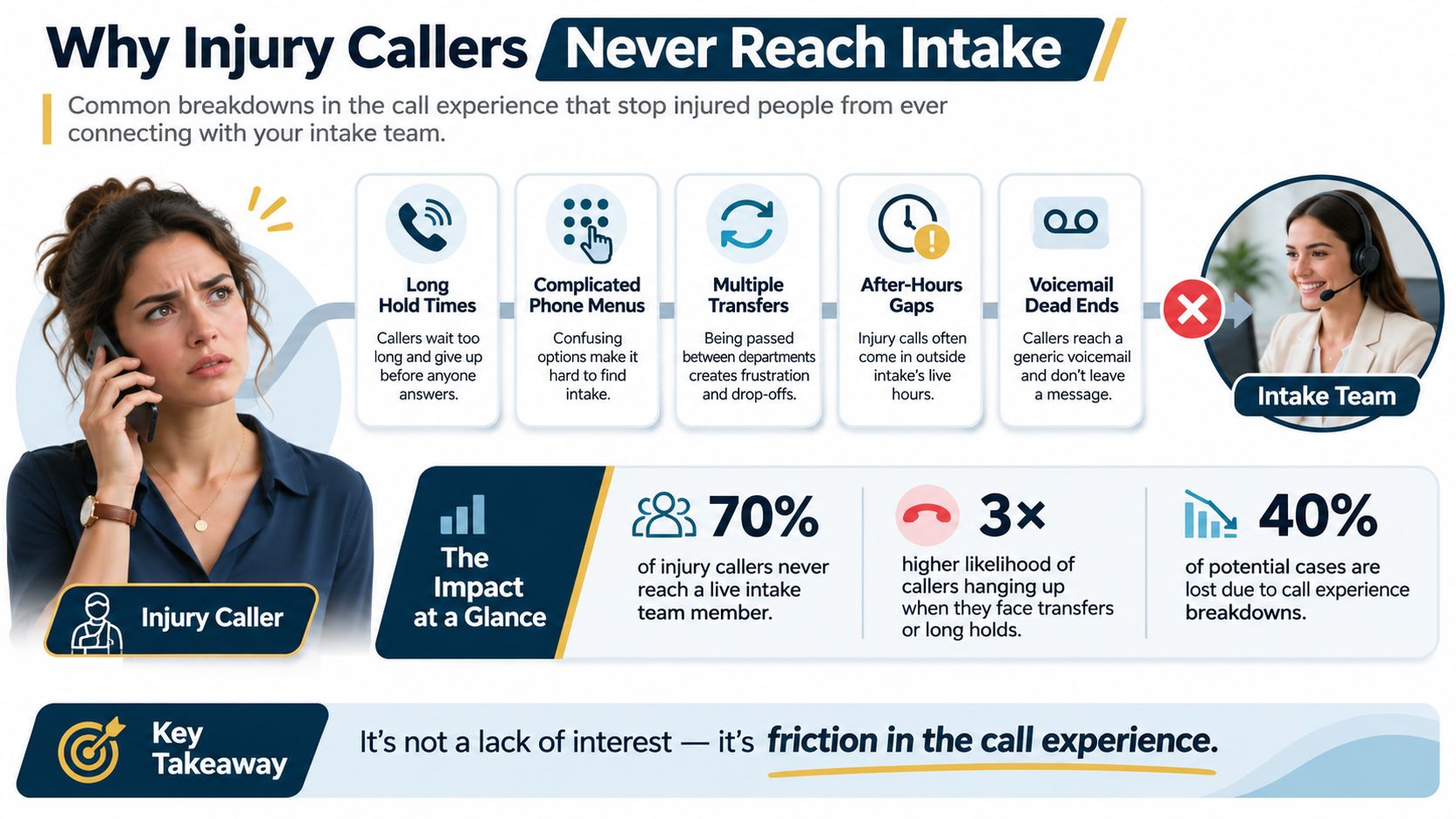
A phone number isn’t an intake process
A listed number gives someone a way to call. Intake requires someone to collect usable facts and assign a next action.
For a caller trying several firms that evening, the first live conversation may be your only opportunity to capture those facts. That doesn’t mean an attorney must answer every inquiry. It means the person answering needs more than a promise to pass along a message.
Ares’ guide to legal intake solutions for PI firms is a useful companion when defining what should happen between greeting and attorney review. Our discussion of what happens when no one answers the phone helps frame the coverage gap itself.
Start by identifying when callers can’t reach intake. The right staffing arrangement follows from that gap, not from a vendor’s feature list.
Personal Injury Call Center Models Compared
Four ways to cover a personal injury intake line
| Model | Who answers | Typical hours | What the caller gets | Main limit |
|---|---|---|---|---|
| In-house attorney or intake staff | People who know the docket | Office hours, plus whoever can grab the phone | Judgment and a real conversation | Nights, weekends, and overflow can go unanswered |
| Traditional answering service | Human agents on a script | Often continuous or after-hours coverage | A message and basic details | Without PI-specific questions, the firm reconstructs the story later |
| Personal-injury voice agent | Configurable AI using the firm greeting | Continuous coverage | Firm questions, recording, transcript, report, and transfer when configured | Needs a human handoff and must not give legal advice |
| Hybrid | Staff by day, service or agent for uncovered calls | After hours, no-answer, or designated new-case calls | Daytime judgment plus broader capture | Unclear routing can send calls in loops |
A personal injury call center is organized coverage for new-matter calls. It doesn’t have to mean a room of operators, and it shouldn’t function merely as a general receptionist.
The useful distinction is what happens after someone answers. Does the caller leave a message, complete screening, or reach the person responsible for the next decision?
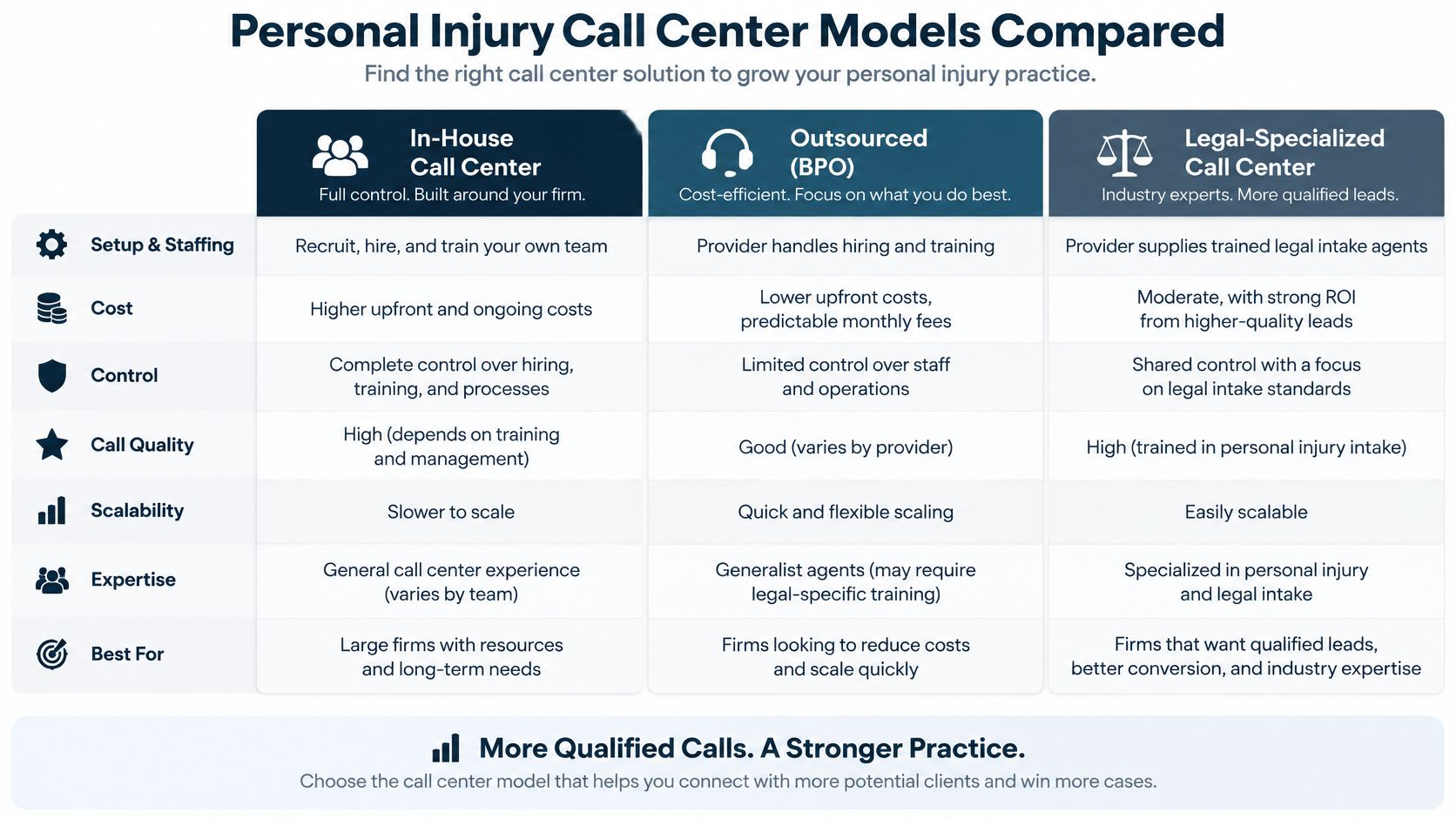
Match the model to the uncovered work
In-house coverage fits calls that require context. A trained intake employee can recognize an existing client, ask a careful follow-up question, or consult an attorney about an unusual fact pattern. But assigning that employee more responsibilities doesn’t create backup when they’re already on another line.
A traditional answering service fits firms that want human coverage outside their staffed hours. Agents may work domestically or overseas; location alone won’t tell you whether they understand your script. Test whether they capture the facts your team needs rather than a generic summary.
A voice agent fits repeatable screening. Its strength is following a defined path consistently, not deciding disputed liability or estimating a settlement. A firm that hasn’t defined its screening rules won’t fix that omission by automating them.
Hybrid coverage fits an office whose daytime intake already works. Keep that team in place and cover the periods when nobody can answer. BUNCH’s resource on planning call center outsourcing for startups offers a broader way to think about dividing internal work from outsourced coverage.
Compare workload, not just the invoice
Evaluate the cost of staffing, supervision, script maintenance, and attorney follow-up. A cheap message-taking arrangement can still leave your employee rebuilding every caller’s account.
Use our guide to answering service costs to organize that comparison, without treating unlike services as interchangeable.
Fit test: If the calls you miss are mostly at night, don’t start by replacing the staff who already handle daytime intake well.
How One Injury Intake Call Runs
A useful intake call ends with a decision about what happens next. A friendly greeting helps, but it doesn’t replace a short, controlled question path.
In Clio’s 2024 secret-shopper research involving 500 U.S. law firms, only 40% answered a prospective client’s call, as described in GB Advisors’ law-firm intake overview. That’s an accessibility benchmark, not evidence that automation alone produces more signed cases.
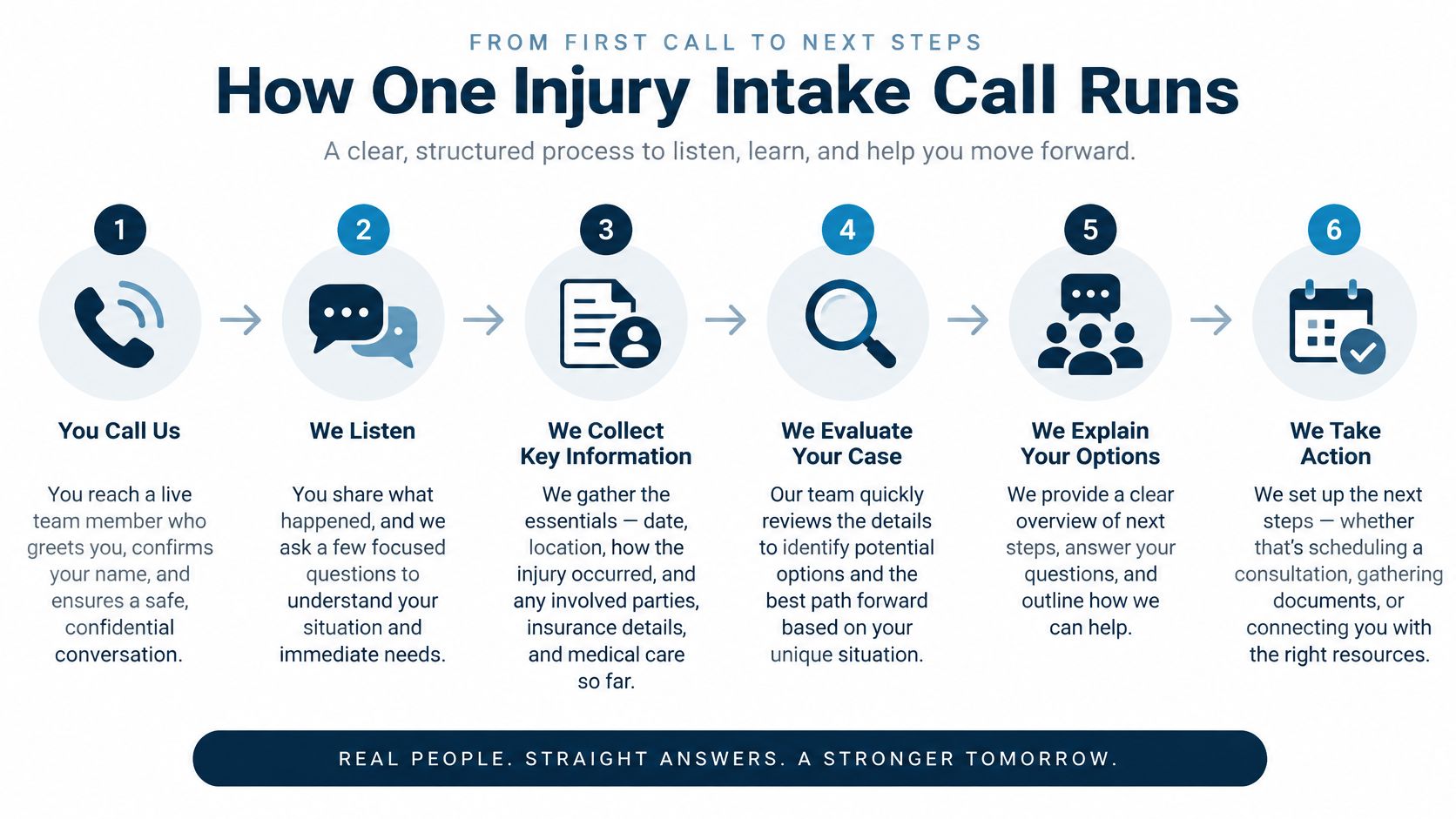
Give every answer a purpose
-
Identify the firm and establish the recording choice. Use the firm greeting, explain any recording or transcription, and provide a way to request a person. Complete the approved consent process before collecting the accident story.
-
Capture the core incident facts. In our intake workflow, we collect what kind of accident happened, when it happened, whether the caller received medical treatment, and where it happened. These questions give the reviewer a usable starting point without asking the caller to understand legal categories.
-
Add only decision-changing questions. Injury description, adverse-party details, insurance, prior counsel, and callback preference can guide review. Remove optional questions that don’t affect routing, but keep the client’s name and phone number required in our intake configuration.
-
Assign a clear disposition. Choose qualified transfer, human review, conflict check, referral, or not a fit. Don’t leave the next employee to infer the result from a paragraph of notes.
-
Complete the handoff. Route priority and human-requested calls to staff under the firm’s escalation plan. For other calls, preserve an authorized report and any permitted recording or transcript.
-
Check the execution. A supervisor should sample completed calls against the approved script version. Check missing fields, incorrect routing, and whether the caller’s request for help was honored.
What one injury intake call must capture
| Item | What is recorded | What it decides |
|---|---|---|
| Call type and timing | Accident type, incident date, location | Jurisdiction and timing issues for attorney review |
| Injury and care | Injury description, treatment status | Urgency and available medical facts |
| Other parties | Adverse party, insurance, prior counsel | Conflict review and who else is involved |
| Callback | Preferred callback method | How review continues without a live transfer |
| Qualified transfer | High-priority or human-requested call | Connect to staff during this call |
| Human-review queue | Sufficient information without an immediate escalation trigger | Attorney reviews later |
| Conflict check | Prior counsel or adverse-party match | Hold for review before advice or signup |
| Referral or not a fit | Outside the practice or an unmet screening criterion | Refer, clarify, or decline without implying a consultation |
Protect the record you create
Recordings contain accident accounts and medical information, not just administrative chatter. Define access permissions, encryption, retention, deletion, and responsibility for reviewing exceptions.
Keep uncertainty visible. An unknown treatment status belongs in a review queue when appropriate, not converted into a negative answer.
Speed Benchmarks Worth Tracking
A callback queue and an answered intake line perform different jobs. One stores an obligation for later; the other starts collecting information while the caller is available.
The Lead Response Management study examined more than 15,000 web-generated leads and approximately 100,000 call attempts across six companies, finding that contact within five minutes rather than after 30 minutes increased the odds of contact by roughly 100 times and qualification by roughly 21 times, according to Attorney Assistant’s speed-to-lead overview. Those findings concern broader lead response, not a personal-injury trial or a promise of signed cases.
Build a weekly view of the handoff
For a plaintiff firm, the practical question is whether staff can act while the caller is still reachable. A distressed caller may answer immediately but be unavailable later because they’re receiving care, arranging transportation, or speaking with another firm.
Track these measures together:
- Answer rate by hour. Show when callers reach the intake workflow, separating business hours from after-hours coverage.
- Time to human transfer. Measure elapsed time through connection, not merely when the system starts dialing staff.
- Required-field completion. Count whether the intake contains the information the reviewer needs, while preserving unknown answers.
- Qualified-call abandonment. Identify callers who meet the screening criteria but disconnect before the intended handoff.
- Callback success by delay. Group follow-up attempts by elapsed time and record whether staff reach the caller.
Compare transfer completion, qualification, and signed-consultation outcomes across coverage periods. Keep the definitions stable, so a script change doesn’t make a dashboard improvement look larger than it is.
Read the exceptions before expanding
Suppose the line answers reliably, but priority callers disconnect while waiting for staff. More answering capacity won’t repair an unattended transfer destination. Assign a backup recipient and define what happens if nobody accepts.
Alternatively, a low completion rate may reflect an overly long questionnaire rather than slow staff. Review where callers stop before removing useful screening questions.
A full voicemail box can make an office look busy while the useful response window has already passed.
Call volume tells you how much activity reached the phone system. It doesn’t tell you whether anyone completed intake or took responsibility for the caller.
Recording Consent Across State Lines
Announcing that a call is recorded doesn’t, by itself, settle the consent question. The firm needs a legally reviewed process that determines whether capture can continue and what happens when the caller declines.
Federal law generally provides a one-party-consent baseline, while California, Florida, Illinois, Pennsylvania, and Washington generally impose all-party-consent requirements for telephone recording, as summarized in Dograh’s guide to AI voice agents for law firms. These are general standards, not a substitute for advice about exceptions or interstate calls.
Recording rules that change the intake script
| Rule | Consent standard | What not to assume |
|---|---|---|
| Federal baseline | Generally one-party | It resolves stricter state requirements |
| California | Generally all-party | A disclosure alone proves consent |
| Florida | Generally all-party | The caller is in the firm’s state |
| Illinois | Generally all-party | Area code establishes current location |
| Pennsylvania | Generally all-party | A caller who refuses recording no longer needs help |
| Washington | Generally all-party | Medical details haven’t already entered the recording |
| Location unknown | Treat as unclear | The phone number establishes location |
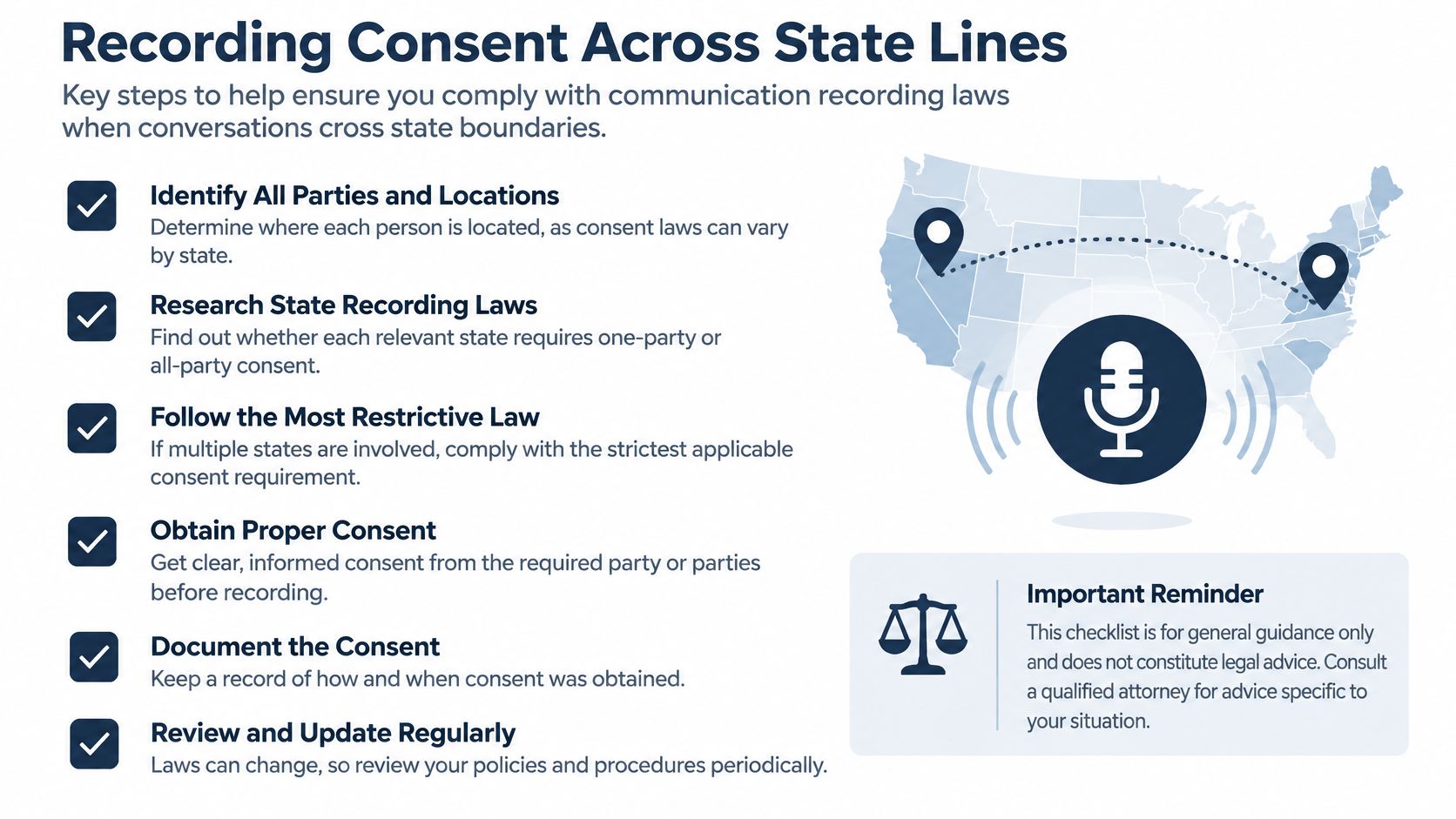
Design the refusal path before launch
A caller may be traveling, using a hospital phone, or calling from a different state than their number suggests. They may also begin describing treatment before understanding that transcription is active.
Write explicit instructions for these situations:
- Location known and all-party consent implicated. Apply counsel-approved language and log the response before recording proceeds.
- Location unknown. Don’t infer permission from an area code. Follow the firm’s approved uncertainty procedure, which may require affirmative consent or a non-recorded route.
- Caller refuses. Offer a verified alternative, such as a non-recorded human line or another supervised intake channel. Don’t promise unrecorded service unless the entire route disables capture.
A human transfer isn’t automatically a non-recorded alternative. Check the destination line, transcription service, and any downstream system that might continue capturing audio.
Keep less when less is sufficient
Consent logs should identify the response, the script version used, and the action taken. Assign a staff owner for refusals and uncertain-location calls, along with retention and deletion rules.
Typist’s discussion of privacy expectations when recording conversations can help staff understand the trust issue. Use our overview of call-recording legality to prepare operational questions, then have counsel approve the actual workflow.
Selective capture may reduce unnecessary exposure without sacrificing answering coverage. Any message alternative also needs clear boundaries: texts to Lighthouse Legal aren’t a channel for legal advice or emergencies.
Callers a Voice Script Still Misses
A caller is in a hospital room with a television playing nearby. She speaks softly, has a strong accent, and asks the agent to repeat a question. If the system treats misunderstood speech as an absent injury or an unclear incident, it can screen out the caller for the wrong reason.
The 2025 New York courts technology report identifies limited device access and insufficient resources for people with limited English proficiency as continuing barriers to justice. A telephone workflow shouldn’t add another barrier by requiring clear speech, a quiet room, and a private smartphone.
Test recovery, not just recognition
Use practice callers with a strong accent, background noise, a request for an interpreter, and repeated requests for clarification. Include speech differences, hearing limitations, and someone who can’t comfortably read a text message.
The pass standard isn’t whether the agent finishes its script. Check whether it can recover appropriately:
- Recognize uncertainty. It should acknowledge missing or unclear information rather than fill gaps with a confident guess.
- Offer a usable alternative. Provide a person, keypad input, or a supervised message channel appropriate to the caller’s needs.
- Preserve meaning. Keep the caller’s own wording where possible and flag uncertain transcription.
- Carry context forward. Send available facts with the transfer so staff don’t require the caller to start over.
Separate communication difficulty from case screening
Use a distinct disposition for incomplete communication. That lets a reviewer distinguish a caller who doesn’t meet practice criteria from someone the system couldn’t understand.
Track abandonment, transfer completion, correction frequency, and outcomes by language where appropriate. Review the underlying calls or authorized records before deciding that a language group produces fewer suitable inquiries.
After-hours access isn’t access if only easy-to-recognize speech gets through.
A non-voice option must also work for the person using it. Don’t force someone with low literacy into a long form or send confidential details to a shared phone without confirming that it’s appropriate.
Try the Smallest Coverage Window First
Use the uncovered hours as the boundary for a test. If daytime employees handle new-case calls well, begin with after-hours or unanswered calls. If the attorney is the only intake desk, the test needs to address interruptions throughout the working day as well.
We can configure coverage for all new-case calls, after-hours calls, or calls staff don’t answer, depending on the phone provider’s options. Keep the initial forwarding rule narrow enough that you can tell what changed.
Run a controlled forwarding test
-
Call the demo with made-up facts. Our demo agent is available at +1 (681) 376-0380. Act as a new injury caller, but don’t use a real client’s medical details or identifying information.
-
Read the transcript and report. Mark questions that don’t help your firm decide what to do next. Check whether uncertain answers remain uncertain and whether the summary matches what you said.
-
Use a limited forwarding window. Ask about our free trial and begin on a new number or a limited forwarding schedule. Leave the main-line arrangement unchanged outside that window so staff retain a familiar fallback.
-
Compare usable outcomes. Review answered calls, completed required fields, and successful transfers for the selected hours. Widen coverage only when the results justify it and staff can handle the resulting handoffs.
During the test, refuse recording, request a person, and deliberately give an unclear answer. Confirm what the system does, including whether the receiving employee gets the facts already collected. If a required alternative isn’t available, resolve that gap before sending real callers through it.
Set a go-or-stop decision
Name the employee who can pause forwarding and the person who approves script changes. Save the tested script and routing rules so an accidental edit doesn’t change the process.
Our service uses a flat monthly rate based on call volume, quoted during a demonstration, without per-minute metering or a long-term contract under the published terms. Judge that expense against completed intake work and dependable handoffs, not the number of calls answered.
A small test should expose operational weaknesses while they’re still manageable. If staff receive clear reports but transfers fail, repair the destination coverage; if callers can’t use the alternative path, don’t expand until they can.
Lighthouse Legal offers customizable voice AI for personal injury firms to answer calls, collect firm-defined intake details, and transfer high-priority callers to the team without giving legal advice. Visit Lighthouse Legal to try the demo and discuss a limited coverage test that includes recording choices, human escalation, and a workable alternative when voice intake fails.