A prospective client calls your personal injury firm at 9 p.m. after a crash. The office is closed, the caller doesn’t leave a useful voicemail, and by morning they’ve already contacted another firm. The problem isn’t just that nobody answered. It’s that the firm has no reliable record of what the caller needed or who should follow up.
A call management application sits between the firm’s phone number and its people. Think of it as a hotel front desk that never closes: it receives calls, records what happened, and gets urgent inquiries to the manager on duty. The buying test is not only whether the system answers. It’s whether staff can confirm, correct, and act on the call record afterward.
What a Call Management Application Does for Your Firm
A call management application can answer, route, and organize calls so the next step doesn’t depend on a receptionist remembering a conversation or a note left on a desk. Depending on the setup, it may queue calls, capture voicemail, record and transcribe conversations, screen callers with intake questions, or provide after-hours coverage. For a law firm, those functions matter when they turn an unanswered call into a usable intake record and a clear follow-up task.
The scale of the coverage problem is worth understanding, without treating general small-business findings as a law-firm benchmark. An observational study of 85 small businesses across 58 industries found that 37.8% of incoming calls were answered by a live person, 37.8% went to voicemail, and 24.3% received no response, according to BeginBound’s missed-call study. The study wasn’t specific to law firms, but it illustrates why firms shouldn’t assume every caller will leave a message and wait.
For intake, a missed call can mean a lost prospect, incomplete details, or a callback delayed until someone has time to reconstruct what happened. A structured workflow gives the caller another route to provide information, even when staff are unavailable. That doesn’t make every inquiry suitable for the firm, but it gives the team something concrete to evaluate.

Practical rule: Treat continuous answering as an intake control, not as proof that every caller has been handled well.
A useful way to assess the system is to follow three jobs from start to finish: answer and route the call, preserve the intake details, and decide what happens next. Firms comparing operational tools may also find it useful to explore law firm business applications, especially when deciding how phone intake fits into the rest of the firm’s processes.
Core Features and the Workflow Each One Supports
| Feature | What It Does | Workflow It Supports |
|---|---|---|
| Call routing | Decides where each call goes based on the firm’s settings | Keeps daytime calls with staff and sends other calls to intake |
| After-hours coverage | Answers when the office is closed | Captures prospective clients who would otherwise call the next firm |
| Call forwarding | Sends calls from the firm’s existing number to the application | Sets which calls enter the application and when |
| Live transfer | Connects a qualified or high-priority caller to a named contact | Moves urgent intake to a person quickly |
| Screening questions | Asks the firm’s own intake questions and collects contact details | Gives every call the same set of facts to review |
| Recording and transcript | Keeps the audio and text of each call | Lets reviewers check unclear facts later |
| Call report | Summarizes the extracted details, call outcome, and transfer result | Provides the first read before anyone opens the audio |
| Intake record | Stores the call details for review | Gives staff the material to assign a follow-up owner |
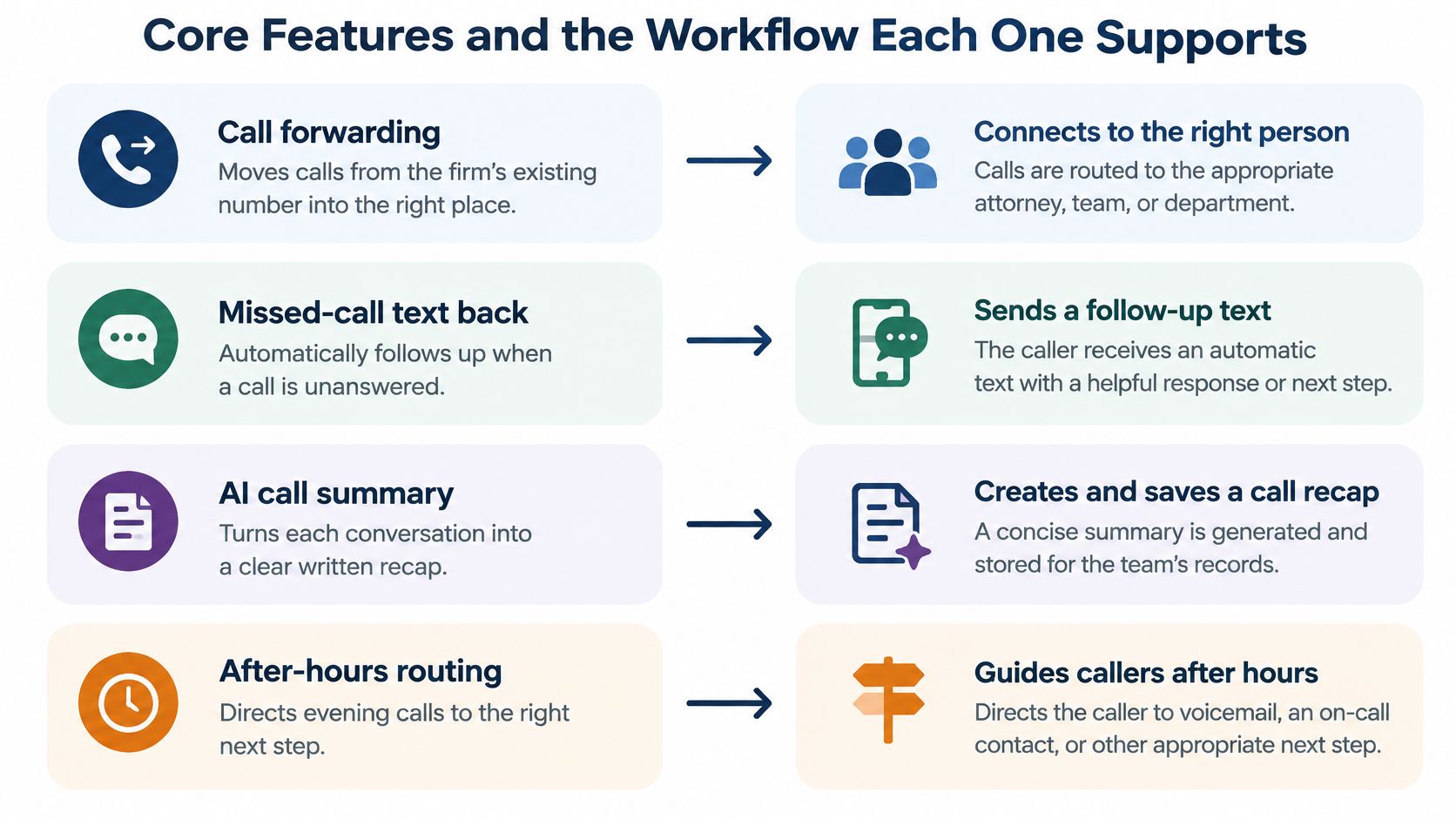
Three distinctions prevent common setup mistakes. Call forwarding changes where a call to the firm’s existing number goes; it doesn’t mean the caller has spoken to a person. Live transfer is a separate step that attempts to connect a caller with a named contact. The post-call workflow begins after the call: staff check the saved information, decide what needs attention, and make sure someone owns the callback.
The routing rules should match how the firm works. Lighthouse can be set to answer all new-case calls, after-hours calls, or calls staff don’t answer, subject to the phone provider’s options. We provide a call-forwarding setup guide and a guide explaining the difference between sending calls to Lighthouse and connecting callers back to staff. The line that matters is scope: the application sees the calls routed through it, not every staff conversation or every other firm number automatically.
That scope is easy to miss when a demonstration focuses on the answering experience. Confirm which numbers and hours feed the application before treating its records as a complete intake log. If you’re planning coverage across in-house and remote staff, English requirements for remote customer support can help frame the staffing questions around availability, handoffs, and communication standards.
A feature earns its place when it replaces a question staff currently have to answer by hand, such as who covers evening calls or who calls back after a missed transfer.
Fields an Intake Manager Should See in Each Call
Use one review rule: a confirmed field goes into the record; an unconfirmed field is marked for callback or human review. Don’t treat a plausible AI extraction as confirmation, particularly for contact details, dates, or medical descriptions.
| Field | Why It Matters | Where to Check |
|---|---|---|
| Caller contact details | Needed for any callback; spelling and number must be correct | Extracted details, then transcript if unclear |
| Reason for calling | Shows whether the matter fits the firm’s criteria | AI summary |
| Accident type | Shows whether the matter is in the firm’s practice areas | Extracted details |
| Accident date | Affects urgency and deadline triage | Extracted details, transcript for exact dates |
| Accident location | Confirms jurisdiction and fit | Extracted details, transcript for exact place names |
| Treatment discussed | Flags injuries and urgency | AI summary, transcript for exact wording |
| Call outcome | Records whether the caller was qualified, transferred, or left a message | Call report |
| Transfer result | Shows whether a live transfer connected to the right person | Call report, recording if disputed |
| Follow-up owner | Names who calls back and by when | Assigned by the firm in its case-management workflow |
Telephone audio is a difficult environment for speech recognition. A caller may be on a mobile handset or speakerphone, speak over background noise, interrupt, or use words the recognition system hasn’t interpreted correctly. NIST’s 2018 Speaker Recognition Evaluation examined conversational telephone speech and found that channel and domain conditions affected system performance. The practical takeaway is to test the application on representative calls, not just clean demonstration audio.
Speech diversity adds another reason to keep a human path available. A 2025 telephone accessibility report by STAMMA found that 65% of surveyed calls involving people who stammer were mishandled; 24% of respondents said voice-recognition systems didn’t understand their speech. An automated menu or intake score shouldn’t prevent a caller from repeating an answer or speaking with a person.
For a closer look at the handling of sensitive client information, use a resource on choosing secure client management tools. The firm still needs to assign the follow-up owner in its own case-management workflow. That final check turns a useful record into an accountable next step.
How to Review an Overnight Call in Five Steps
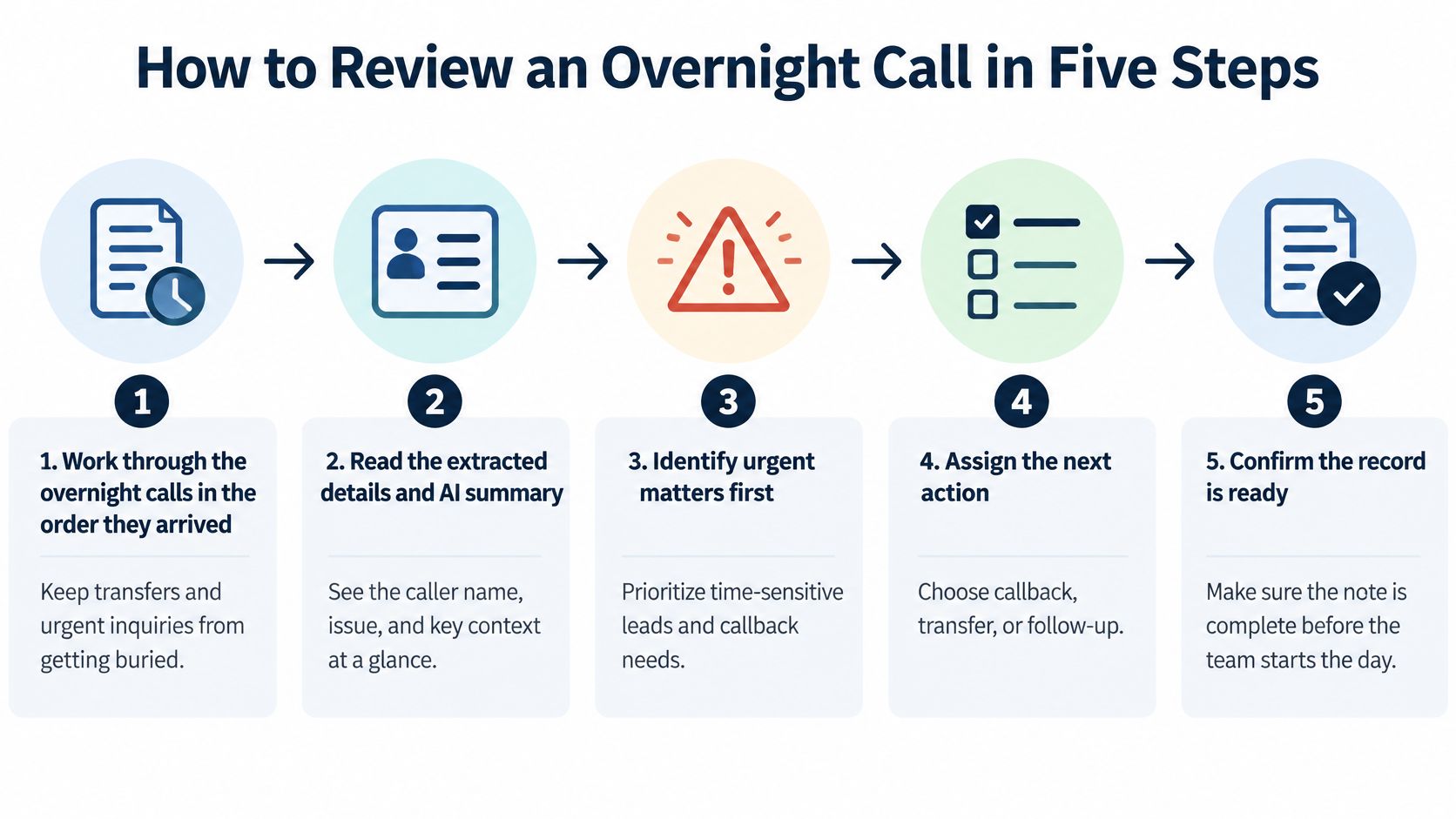
A morning review should leave no record stranded between the application and the firm’s case-management workflow. Use this sequence for each overnight call.
-
Work through the overnight calls in the order they arrived. This keeps a transfer attempt or time-sensitive inquiry from disappearing beneath later records. Note which calls need immediate attention before working through routine callbacks.
-
Read the extracted details and AI summary. Use the summary as the quick first read, then decide whether the inquiry appears to fit the firm’s criteria. For remaining calls, the Lighthouse agent asks the firm’s questions and connects qualified callers to the team.
-
Open the transcript when a fact or phrase is unclear. Check it for details such as a date, location, or phone number, and for exact wording that could change how staff understand an injury. The transcript is more useful than guessing from a short summary.
-
Listen to the relevant part of the recording if doubt remains. Start with the specific passage rather than replaying a whole call without a reason. The audio can settle a disputed detail when the transcript doesn’t.
-
Confirm the outcome and assign the next action. Check whether a transfer reached the intended person, then assign the follow-up owner in the firm’s case-management workflow and set the callback. A record isn’t ready just because it has a summary.
The application records the call up to handoff. It doesn’t record or transcribe the private conversation between the caller and attorney after the handoff. For examples of review screens and transcript-checking, see Lighthouse’s dashboard guide and guide to checking AI call transcripts.
A complete review leaves each record with confirmed contact details, a recorded outcome, and a named follow-up owner. If something is uncertain, mark it for clarification rather than letting a confidence score stand in for a decision.
How Chandler Conway Splits Daytime and Overnight Calls
In the published Chandler Conway case study, the firm’s staff take daytime calls. Lighthouse covers evenings and weekends, and picks up when the front desk can’t answer. The intake details help attorneys decide which inquiries to follow up.
That split shows how an application can supplement the firm’s existing staff rather than replace daytime intake. The overnight record gives the team information to consider when deciding what needs attention. A recommended morning routine is to review the overnight calls, read each record’s details and summary, clarify uncertain answers from the transcript, and assign the next action in the firm’s case-management workflow.
The case study doesn’t document a dashboard walkthrough or a daily routine used by the firm. The review sequence here is recommended practice, not a claim about Chandler Conway’s internal habits. Keep that distinction clear when evaluating any customer story: a documented coverage arrangement can show how calls are divided without establishing exactly how employees review every record.
The broader market context makes the coverage question relevant. According to the American Bar Association’s summary of Clio’s 2024 Legal Trends Report, 40% of U.S. law firms answered prospective clients’ phone calls in 2024, down from 56% in 2019, as reported by RefinePM’s law firm intake article. That figure describes U.S. law firms generally, not the performance of a particular firm or application.
Map your own split before choosing a setup. Which hours can staff cover? Which calls currently reach voicemail or go unanswered? Who will own a callback when an inquiry arrives outside those hours? The buyer’s question is simple: how many overnight calls would you lose without a record?
How to Test Routing, Transfers and Missed Transfers
Track both average speed to answer and abandonment rate. Abandonment means eligible inbound callers disconnect before reaching an agent or completing the intended service. There’s no universal acceptable benchmark because queues, urgency, alternatives, and the definition of an eligible call differ. NICE’s contact-center abandonment guidance notes that roughly 4–8% is commonly cited as a healthy range for many contact centers, but that range shouldn’t be applied blindly to personal-injury intake.
Segment the rate by hour, queue, and caller qualification. An overall figure can hide callers dropping out during nights or weekends. Compare answer latency with completed intake and qualified transfers; don’t optimize for fast pickup if callers still fail to reach a person or complete intake.
| Test | What to Check | Evidence That It Works |
|---|---|---|
| Outside call | Call from a phone outside the firm to the number that will receive calls | An intake record appears with caller details and a summary |
| Practice intake | Run a call with made-up case details | The transcript and report match what was said |
| Live transfer | Request a transfer to a named contact | The transfer result shows the right person was reached |
| Missed transfer | Let the contact not answer | The caller stays in the workflow and the record notes the failed transfer |
| Forwarding window | Forward the line only during set hours | Calls outside those hours follow the intended path |
| Follow-up ownership | Assign one record to a staff member | That person sees the record and acts in the case-management workflow |
Run these tests in order. First, call from outside the firm to confirm which calls enter the application and whether other lines or staff conversations are included. Next, use fictional case details and review the transcript and report. Then request a live transfer to a named contact, and repeat the test with that contact unable to answer so you can see what happens to the caller and the saved record.
Test forwarding and live transfer separately. A call can be forwarded correctly and still fail to reach a person. Lighthouse lets prospective customers make test calls with fictional details, review the transcript and report, and see whether staff can tell if a case qualifies for a callback. Its guide to call forwarding versus call transfers explains the difference between sending calls to the application and connecting them back to staff.
Before you commit, ask for written answers to three questions: Does the application connect to your case-management system? Can you export call records? What needs to change in your existing phone setup? Don’t assume a named integration or a particular workflow is available until it’s confirmed.
Data, Recording and Fallback Questions to Settle First
A high answer rate doesn’t answer the governance questions. A prospective client may disclose medical history, accident details, employment information, and facts about other people before the firm represents them. Recordings and transcripts can help staff check what happened, but they also create a sensitive-data footprint.
A 2025 academic analysis of an AI assistant identified risks around purpose limitation, user control, third-party rights, and transparency when call logs and voice content are involved. The analysis published through KCI also raised concerns about reuse of data for AI training and whether existing legal frameworks adequately address that complexity. Treat this as a reason to ask specific questions, not as a substitute for legal advice about your firm’s obligations.
Send vendors a checklist that covers both records and caller experience:
- Ownership and use: Who owns the recordings and transcripts? Are they used to train models or for another purpose?
- Retention and deletion: How long are records kept? How are deletion requests handled?
- Third-party calls: What happens when a family member, witness, or other non-client is recorded?
- Access controls: Which roles can view records? Is access role-based, and do audit logs show who opened a record?
- Security: Is the data encrypted, and what safeguards protect it while stored or transmitted?
- Human fallback: Can a caller interrupt, repeat an answer, or reach a person quickly if recognition fails?
- Review and correction: Can staff check misunderstood answers instead of relying only on an automated qualification score?
Accessibility belongs in the same conversation as answer rate. A system may increase availability while still making it harder for callers with stammers, accents, speech disabilities, hearing-related communication needs, or nonstandard pacing to complete intake. Ask how callers escape a loop and how staff can correct misunderstood answers.
Keeping full call artifacts supports review and accountability, but it expands the amount of sensitive information the firm must govern. Compare vendors on disclosure, retention, access, security, deletion, and human review, not just whether the system answers. Lighthouse’s call-recording guidance is a useful place to begin the firm’s questions; if a vendor’s answer is unclear, ask for it in writing.
Choose a Setup You Can Test This Month
Start with one window your team can’t cover, such as a weekday evening. Don’t redirect the whole phone system before you know what the record and handoff look like.
- Pick the hours staff can’t cover today.
- Forward only that window from the existing number, leaving the rest of the day unchanged.
- Run the routing tests, including a practice intake and a missed transfer.
- Review the first call records using the morning routine, and note each unclear field.
- Change the questions or forwarding hours only after the records show what needs fixing.
Bring your current phone menu to a demonstration and follow one real call path from the menu through intake and the saved record before deciding what to keep. Lighthouse offers a demo in which you can bring a current phone menu and follow a call through before choosing which parts to retain. You can also call the demo agent at +1 (681) 376-0380 and test the experience as a personal injury client.
Expand only when every call record has a confirmed contact, a recorded outcome, and a named follow-up owner.
Lighthouse Legal provides customizable AI voice agents for personal injury firms, with call answering, intake questions, recordings, transcripts, reports, and transfers to the firm’s team. Visit Lighthouse Legal to see how the call path and post-call record could fit your intake workflow.