Legal intake is the process of receiving a prospective client’s inquiry, collecting the facts a firm needs, and choosing the next step, without implying that the firm has accepted the case.
If someone answers the phone and fills out a form, has intake actually worked? Not if nobody knows who should review the information, whether the caller needs urgent attention, or what happens next.
Legal Intake in Plain Terms
Think of intake as the triage desk at an urgent care clinic. The receptionist records who arrived, why they came, and where they should go next. They don’t diagnose or treat the patient.
A law firm’s intake works similarly. A receptionist, online form, automated phone agent, or combination of these can receive an inquiry and organize it for review. The method changes; the responsibility to produce a useful next step doesn’t.

Know the basic terms
- Inquiry: The person’s first contact with the firm.
- Prospective client: Someone seeking help whom the firm hasn’t accepted for representation.
- Disposition: The recorded next step, such as attorney review, follow-up, referral, or decline.
The word legal matters. Even before an engagement, the firm may acquire confidential information or information that affects conflicts. Intake should gather enough to route the inquiry without inviting an unrestricted account of sensitive details.
Clio’s report on client inquiries illustrates why receiving the inquiry matters: in its 2019 secret-shopper study of 1,000 U.S. law firms, only 56% of telephone calls were answered by a person.
Practical rule: Intake should create a documented bridge to professional evaluation, not imitate that evaluation.
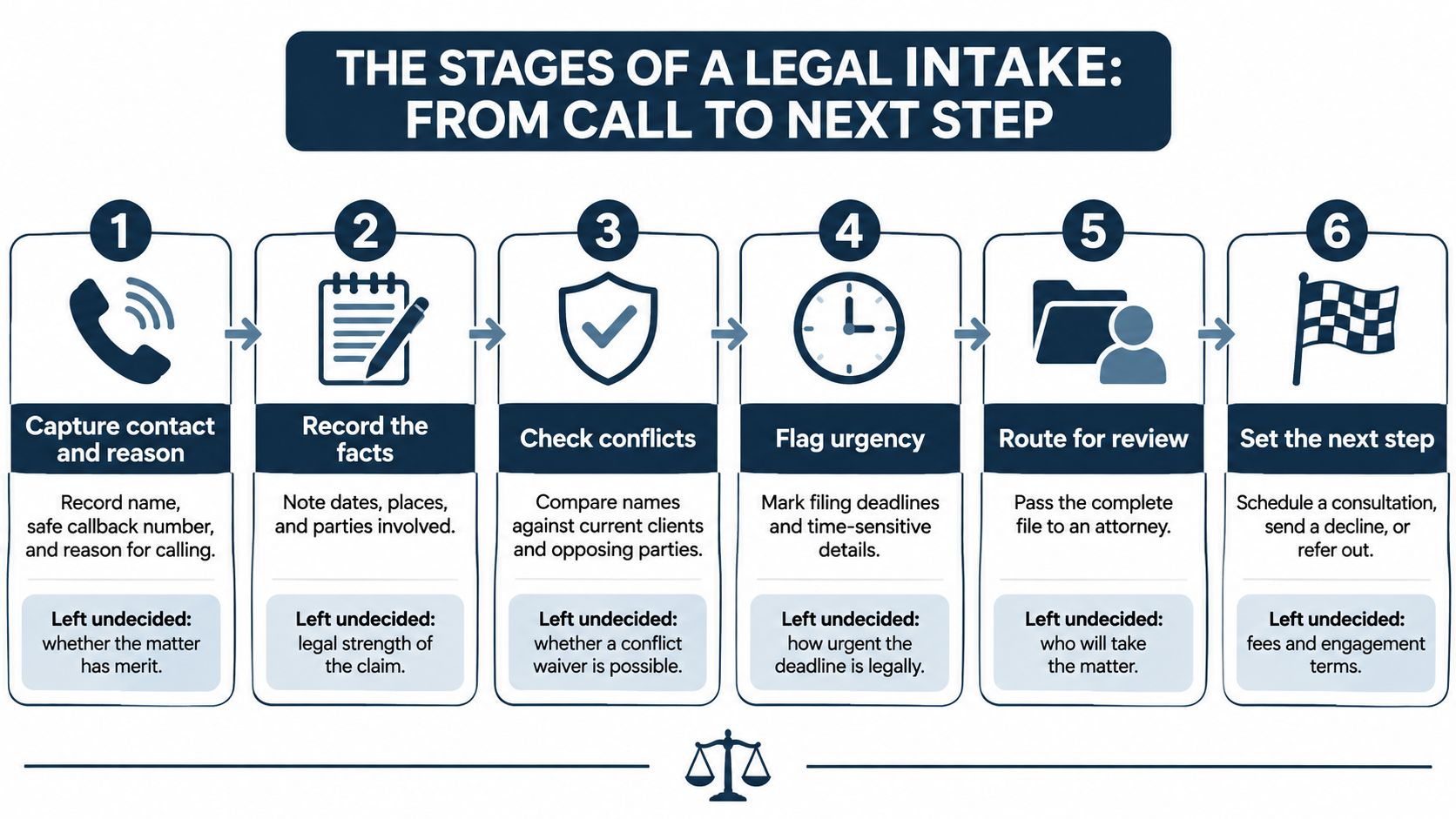
The Stages of a Legal Intake From Call to Next Step
A usable workflow assigns an owner to each handoff. Harvey’s legal client intake guide distinguishes preliminary information collection from review by an attorney or supervisor who records the decision and next action.
- Capture contact and reason. Record the caller’s name, safe callback number, and reason for calling. Leave the merits undecided.
- Identify parties and check conflicts. Obtain the prospective client’s and adverse parties’ names before inviting detailed facts. A possible match goes to the person responsible for conflicts review, not an automatic conclusion.
- Collect the case facts. Record what happened, when, where, injuries, treatment, and relevant insurer contact after the preliminary screen. Don’t turn the caller’s account into verified findings.
- Screen for fit and urgency. Apply the firm’s written criteria and flag time-sensitive circumstances. Leave legal deadline calculations and exceptions to qualified reviewers.
- Route uncertainty to people. Send incomplete, conflicting, or judgment-based information to staff or an attorney. Record who owns the follow-up.
- Set the next step. Document consultation, additional-information request, referral, decline, or pending status. Don’t leave a completed questionnaire sitting without an assigned action.
Caller inquiry → Intake information → Staff or attorney review → Next step
Keep collection separate
The Chandler Conway case study provides a concrete reference: Chandler Conway Law used Lighthouse to collect four key intake facts for the firm’s review. We collect those four facts in a few minutes; the firm reviews them rather than treating collection as a professional decision.
Order matters. Finding a potential conflict before a substantive interview limits unnecessary disclosure. Firms should therefore obtain identifiers before deeper questioning, even where a process diagram groups fact collection and conflicts screening differently.
Draw your own stages. Mark which your team performs reliably, which happen by chance, and which are missing.
What Intake Records and What It Does Not Mean
Finishing intake doesn’t mean the firm accepted the case or that the caller received legal advice. Colorado Bar ethics guidance explains that intake for conflict screening, eligibility review, and identification of legal needs generally doesn’t establish an attorney-client relationship.
Tell the prospective client when representation can begin rather than expecting them to infer it from a status label. At Lighthouse, we ask the firm’s intake questions; completion isn’t acceptance.
Separate the recorded outputs
The three intake outputs and their limits
| Output | Question it answers | What it does not mean |
|---|---|---|
| Eligibility | Does the matter fit the firm’s practice area, jurisdiction and criteria? | A verdict on the strength of the claim |
| Urgency | Does a person need to act or make contact now? | A confirmed legal deadline or any legal advice |
| Disposition | Is the inquiry accepted for review, referred, declined or pending? | An engagement, a signed fee agreement or a representation decision |
Eligibility criteria can include injury severity, defendant type, and limitation-period concerns. Urgency flags call for attention, while disposition tells staff what to do with the file.
ABA guidance on supervised intake work supports separating information collection from legal judgment. Preserve the underlying answers and the screening-rule version so staff can explain why an inquiry was routed or declined.
Our outputs are working aids only. They aren’t legal advice, legal opinions, factual findings, or admissible evidence.
A disposition should identify the reviewer and reason. Use “accepted for attorney review,” not a label that suggests representation has already begun.
Personal Injury Screening Considerations
FICTIONAL RECORD: Jordan Lee; 555-0100; rear-end collision; March 3, 2026; Phoenix, Arizona; evaluated at urgent care; police report pending.
This fictional example follows the basic screening categories described in Cognito Forms’ legal intake guidance: issue, timeline, parties, location, urgency, and supporting documents. It’s deliberately short because a screening record should help the reviewer decide what to investigate, not pretend the investigation is complete.

Read for screening purpose
- Contact details: Give staff a way to call back. Confirm whether leaving a message is safe.
- Incident description and date: Start the factual and timing review without deciding liability or calculating a deadline.
- Location: Helps the firm identify jurisdiction questions.
- Treatment status: Gives the reviewer an initial indication of injuries, care received, and records that may exist. Treatment alone doesn’t establish severity.
- Report status: Identifies a possible document to request. “Pending” doesn’t mean staff have verified that a report exists.
The record still needs party identifiers. Obtain the other driver’s or potential defendant’s name, run the preliminary conflicts search, and collect deeper facts after clearance.
ABA guidance on prospective-client conflicts emphasizes limiting the information obtained before the firm knows whether it can proceed. Don’t ask for settlement positions or litigation strategy merely because a form has room for them.
Flag facts for review
Minimum screening fields commonly include incident date and location, injury description, treatment status, insurance or defendant information, and limitation-period indicators. Ask what notices or documents the caller received, rather than asking them to decide the legal deadline.
An imminent filing deadline, active insurer contact, hospitalization, or request for counsel should trigger the firm’s human-escalation process, including after-hours routing. Staff should record the caller’s words and circumstances without promising a legal outcome.
For field-by-field setup, use our personal injury intake questions guide. The principle is simpler than the configuration: this record is an intake summary, not an acceptance decision or legal assessment.
Where Automation Helps and Where People Decide
Software should work like an organized intake clerk preparing a file. The attorney decides what the facts mean and what professional action to take.
Our workflow gathers answers to the firm’s questions, saves intake fields, and produces a short summary and transcript. The firm designates and supervises the administrative, operational, intake, and scripted communications work the system supports.

Assign professional responsibility
The ABA’s Formal Opinion 506 permits trained, supervised nonlawyers to gather initial information, conduct initial conflicts checks, screen practice-area fit, answer general process or fee questions, and obtain signatures on provided fee agreements. Prospective clients must always have an opportunity to communicate with the lawyer, including about fees and representation scope.
That division helps define the software’s boundary. An unclear injury, distressed caller, flagged conflict, or insurer account that contradicts the caller’s account needs human review, not a more confident automated conclusion.
For planning which administrative steps to automate, law firm intake advice from Truespeak offers an additional resource. Assign an accountable reviewer before routing real inquiries through any automated step.
Review before relying
Customers acknowledge material risks from AI outputs, including inaccurate, incomplete, biased, or fabricated content and hallucinations. They must not rely on our outputs for legal, ethical, regulatory, or client-facing purposes without independent review and approval by a qualified attorney.
Accountability test: Who is responsible for the decision this automated step feeds?
The saved transcript covers the automated conversation before handoff. Lighthouse doesn’t record or transcribe the private caller-attorney conversation after handoff.
Why Unanswered Calls Cost Cases
A firm may intend to welcome inquiries while callers experience silence. Someone who reaches voicemail may call another firm before staff return the message, making a missed call a lost intake opportunity rather than merely an administrative inconvenience.
Clio’s earlier study also reported that 39% of calls went to voicemail, more than half of firms failed to respond to voicemails within 72 hours, and 79% of prospective clients expected a response within 24 hours. Its 2024 follow-up secret-shopper study of 500 U.S. law firms found that 40% answered telephone calls and 48% were effectively unreachable by phone.
Compare the contact gaps
Intake performance in two secret-shopper studies
These studies used different samples. Compare the direction of the findings, not the figures as a single continuous series. “Not reported” means the available study findings don’t provide that measure.
| Measure | 2019 study (1,000 firms) | 2024 study (500 firms) |
|---|---|---|
| Telephone calls answered by a person | 56% | 40% |
| Telephone calls sent to voicemail | 39% | Not reported |
| Firms unreachable by phone (no answer, no callback) | Not reported | 48% |
| Email inquiries answered | Not reported | 33% |
| Prospective clients expecting a response within 24 hours | 79% | Not reported |
| Firms explaining the legal process or next steps by phone | Not reported | 36% |
| Shoppers unlikely to recommend the firm | Not reported | 73% |
Answering matters, but so does explaining what happens next. The process-and-next-steps measure concerns firms that responded by phone, not every firm contacted.
When allocating staff coverage, virtual legal assistant services from HireParalegals provide a resource for considering administrative support. Our guide to 24-hour call centers addresses coverage evaluation.
Measure responsiveness, completeness, and progress toward a qualified consultation. A form’s existence tells you none of those things.
Phone Coverage, Recording and AI Disclosure
After-hours callers still need to reach your intake questions. Lighthouse is an AI receptionist that can handle intake after a phone-menu choice, ask the firm’s own questions, collect required details such as Client Name and Phone Number, and connect qualified callers to the team.
A caller on that path may hear several short messages. Each one answers a different question, so treat them as separate decisions rather than one blended script.
Distinguish the caller notices
- Recording notice: Tells the caller the conversation is being recorded.
- AI introduction: Tells the caller they are speaking with an automated assistant.
- Human handoff: Tells the caller the call is moving to a person.
The recording notice covers what happens to the audio. The AI introduction covers who is on the line. One does not substitute for the other, and many firms record intake calls. Recording and consent rules vary by jurisdiction, so confirm the requirements that apply where your firm operates before writing the script. Our call-recording guide walks through the recording side. If a message’s purpose changes later, get fresh consent where required.
Preserve accessible routes
Sorting only works when callers can reach the questions. The Oregon legal-services accountability report reports that 68% of community-organization respondents identified intake-system problems, including limited or inconvenient access. A high filtering rate can mean callers hit barriers, not that screening worked well.
Callers with disabilities, limited English proficiency, unstable housing, rural connectivity problems, or urgent deadlines may need another route. Build these safeguards into the workflow:
- Human escalation: Transfer on request and provide a fallback when nobody answers.
- Language and accommodations: Arrange interpreter access and accessible communication options.
- Alternative channels: Offer appropriate phone, online, or in-person routes.
- Review of drop-offs: Examine rejected and abandoned inquiries for avoidable barriers.
Lighthouse saves the intake fields, summary, and transcript of each conversation it handles, so staff can review what was asked and answered before an attorney decides what happens next.
Set Up Intake Your Team Can Defend
A defensible intake file reads like a sorting record: it shows what was asked, what the caller answered, which rule applied, and who made the next decision. Give each screening rule an owner, then work through this decision list before routing real callers.
- Write your practice description. Name the matters and locations you handle, plus matters you turn away.
- Classify information needs. Mark each detail required, optional, or excluded based on whether it supports review or follow-up. Client Name and Phone Number stay required; Date of Accident, Incident Location, Medical Treatment, Email and Referral Source can support injury review when the firm wants them.
- Assign urgency contacts. Define who receives each trigger, including outside office hours.
- Set disposition labels. Specify when an inquiry stays pending rather than being declined, and remember that a completed intake does not mean the firm has accepted the case.
- Define human fallback. Set the transfer rule and the stated callback window.
- Test the workflow. Use practice calls, then schedule reviews of rejected and abandoned inquiries.
Prepare the supporting work
For organizing documents after screening, legal document support for small practices from GRIT Virtual Assistants LLC is a resource to consider. Keep document handling separate from the lawyer’s assessment.
Lighthouse uses a flat monthly rate set by call volume, with no per-minute metering or long-term contract, and specific prices are discussed during a demonstration.
The customization walkthrough shows the questions an intake agent can ask, and the after-hours intake guide explains coverage considerations for a small practice. Treat fields, summaries and transcripts as working aids: automation gathers the record, while a qualified attorney reviews and approves any legal, ethical, regulatory or client-facing use.
Intake is complete when the firm has a documented next step.
Lighthouse Legal offers customizable AI intake that gathers information using your firm’s questions and connects qualified callers with your team. Visit Lighthouse Legal to explore a workflow that keeps fact collection organized and professional decisions with your people.